
Dubai’s Real Estate Market is growing popular and is widely recognized for the luxury properties, high The real estate business mostly works on time and reaching out to the clients on time is of utmost importance. Now when businesses are dealing with multiple property listings on multiple properties it gets tough to keep track and clients walk off.
Due to this reason, the property portal integration within CRM becomes a necessity. This helps with managing multiple portals and listings via a single CRM, and the agents do not have to spend time switching tabs and searching for leads manually.
Since the listings are managed through a single inbox, each agent has clear visibility of what is going on and they can coordinate with the customers seamlessly without much hassle.This automation and integration of property portals within the CRM allows the agents to manage their listings efficiently and keep track of every lead that is generated via these portals.
Challenges Faced in Managing Multiple Property Portals Without the CRM Integration
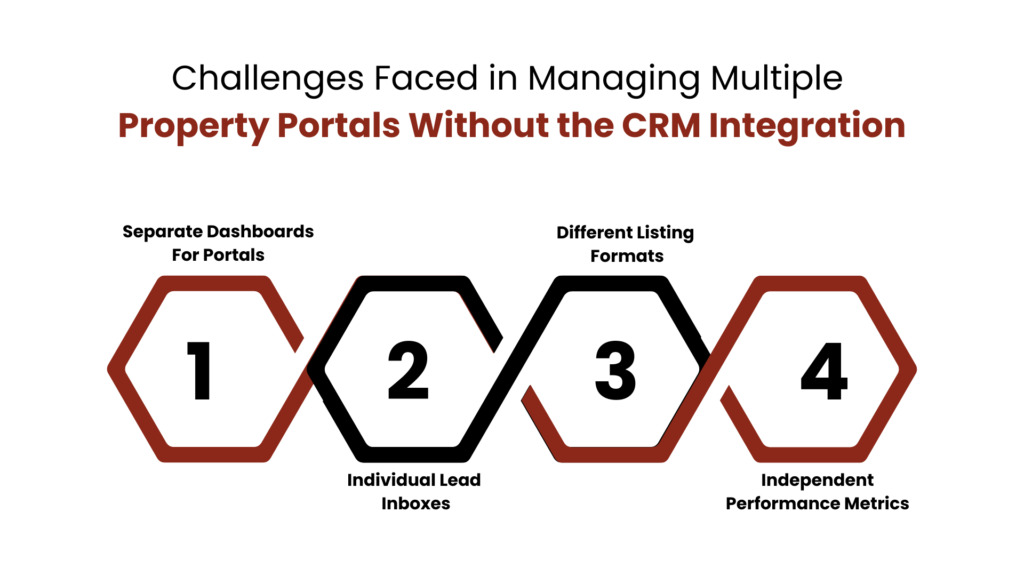
Managing a wide range of property portals is tough and keeping track of all the leads on so many portals brings its own challenges. Each portal has their own dashboard, and the listing formats are different for all of them. This way the agents are adding the property units manually into spreadsheets and juggle between them, making the entire process slow down and leading to missed responses and opportunities.
Separate Dashboards For Portals
Managing several property portals individually is a challenge since each portal has a separate dashboard and a unique way of property management. Every time an agent needs to check the property vitals, they must first login into different portals’ dashboard and check the details individually and then add the data to spreadsheets.
Individual Lead Inboxes
Each property portal comes with a distinctive lead inbox. This means that whenever an agent needs to catch up with a prospect they will need to look for conversations across different platforms due to scattered data. This then creates chaos in the communication channel and the agents are left confused resulting in lost leads.
Different Listing Formats
Each property portal have different types of content added including pricing, features, amenities, description etc. and adding different kind of data for each individual property on each portal is not only a tedious task but also a time consuming tasks that requires a lot of brainstorming and changing these data points frequently results in missed opportunities.
Independent Performance Metrics
Separate property portals provide separated data to measure performance such as views, inquiries, and lead counts. The data remains isolated this way and comparing the performance becomes a challenge. Without a unified inbox channel it becomes impossible to identify which channels drive the best results and which listings actually perform. This limits the data-driven decision making and optimization.
What Role Does A CRM Play in Managing The Property Portals?
Managing multiple property portals is a tiresome task and no real estate business can afford to lose leads. The property portal integration within CRM not only enables automation on certain levels, but also makes it easier for the estate agencies to have clear visibility on each portal and each listing.
The teams can easily sync their data and maintain accurate listings. Further, they can respond to queries faster without losing time and since the CRM captures the lead automatically, no additional effort is required.
Unified View of All property Portals
When real estate businesses integrate all their property portals in a CRM then each team, each agent, and each personnel at the management and leadership level has clear visibility of each listing on each portal in a single inbox. This results in smooth property management and the agents are not spending their time collating data from each portal separately into a spreadsheet. The data is automatically gathered within the CRM and the agents can clearly focus on nurturing leads.
Easy Management of High Listing Volumes
For real estate brokers and developers managing high volume leads in hundreds or thousands is a common phenomenon and property portals integration within CRM makes this easier to deal with. Agents can organise their listings by project, location, or status and assign dedicated teams for specific inventories.
Better Lead Prioritization
It is safe to say that not all leads are equal and each one holds a different position. By integrating all your property portals into one CRM it becomes simple to understand which leads are worth following and which leads can be left out. The CRM running on automation helps with the lead scoring and based on those results the estate agencies can prioritize leads in a better manner.
Stronger Accountability And Transparency
When each team and each agent has clear and unified access to the customer history it results in stronger accountability and transparency in the process. Each individual is clear about what they are responsible for and who they are accountable to. Additionally, the unified inbox creates transparency in the system and each team has a clear vision of everything that needs to be done and what is the status for each property portal and each property unit.
Best Practices For Property Portal Integration Within CRM
Integrating Property Portals within a CRM is a wise move by the real estate businesses. However, though this may seem easy, it does require a plan in place and must be well executed to enable smooth workflows.
The companies must define clear objectives and communicate them clearly to the teams as well. It should be pre-decided if the aim with the property management CRM is lead management, listing control or performance tracking.
Further, the listing data must be collated in a single format and should not be scattered. This allows the estate agencies to be seamless in their conversations and each team can easily access the system to find the information they need.
Conclusion
Managing multiple property units without a CRM integration is a tiresome task and that is why the property portal integration within CRM plays a crucial role in cracking the real estate business. The CRM integration brings automation on certain levels allowing the real estate agents to communicate seamlessly within the team and manage their listings effectively.
Further, when all the property portals are managed from a single inbox it is simpler to identify the top performing properties and keep track of the leads flowing on each portal without having to switch screens.
FAQs
1. What is a CRM in property?
For estate agencies, a CRM (Customer Relationship Management) system is a software tool designed to help estate agents and agencies manage their interactions with clients and potential clients. It helps organise and track contacts, manage leads, and streamline communication.
2. What is a property portal?
A real estate web portal is an online platform that centralizes buyers, renters, sellers, and agents. With it, users can search properties, look at listings with photos or videos, arrange visits, and connect with agents.
3. How to use CRM in real estate?
A real estate CRM centrally stores and updates client and property information while tracking the sales pipeline and closings. It helps teams respond to inquiries faster and run personalized marketing campaigns without managing multiple inboxes.
4. How does CRM integration help manage multiple property portals?
CRM integration centralizes all property portals into a single system. Listings, leads, and inquiries are automatically synced. This gives teams clear visibility and helps manage portals more efficiently.
5. How does a CRM help with high-volume listing management?
A CRM allows agents to organize listings by project, location, or status. Dedicated teams can be assigned to specific inventories. This makes managing hundreds or thousands of listings more structured and manageable.
For more insights, updates, and expert tips, follow us on LinkedIn.